Apple Store

BARE FEATS - real world Mac speed tests


MAIN INDEX of latest speed tests


Lost data? We can help!


UltraSharp 2707WFP 27 in Widescreen Flat Panel LCD Monitor with Height Adjustable Stand
Check out the 27" Dell LCD

CS3-PSD-125x125

REVIEW: ATI Radeon X1900 GT
For G5 Power Macs with PCIe slots

Originally posted November 11th, 2006 by rob-ART morgan, mad scientist

Many owners of dual-core and quad-core G5 Power Macs have been frustrated with the lack of high end aftermarket graphics cards. I was hoping that Apple would offer the GeForce 7800 GT as a kit the same way they are doing the Radeon X1900 XT for the Mac Pro buyers. But that never materialized.

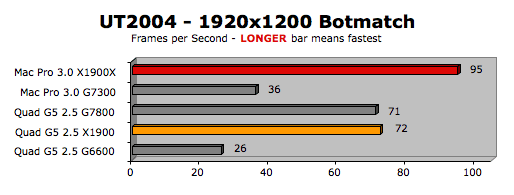
Thankfully, ATI has come to the rescue with their Radeon X1900 GT for G5. This card is for G5s with PCI Express (PCIe) slots. It comes with 256MB of GDDR3 video memory and two DVI ports, both of which support displays up to 2560x1600 (like the 30" Apple Cinema). We compared it to the other "consumer" graphics cards compatible with the dual-core G5 Power Mac as well as to two of the cards available for the Mac Pro. (We measured the core clock speed at 507MHz and core memory speed at 1206MHz.)

GRAPH LEGEND:
Mac Pro 3.0 = Apple Mac Pro 3GHz with the test cards in the 16 lane PCIe slot
Quad G5 2.5 = Apple Quad-Core G5/2.5GHz with test cards in the 16 lane PCIe slot
X1900X = Radeon X1900 XT PCIe GPU for Mac Pro only with 512MB GDDR3
G7300 = GeForce 7300 GT PCIe GPU for Mac Pro only with 256MB GDDR3
G7800 = GeForce 7800 GT PCIe GPU for G5 Power Mac only with 256MB GDDR3
X1900 = Radeon X1900 GT PCIe GPU for G5 Power Mac only with 256MB GDDR3
G6600 = GeForce 6600 PCIe GPU for G5 Power Mac only with 256MB GDDR


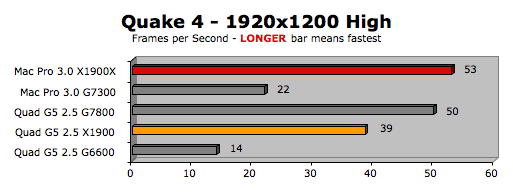
Quake 4 (1.3) Settings: High Quality, Widescreen, No Vsync, No Anti-Aliasing, all other advanced settings enabled including multi-processor mode.
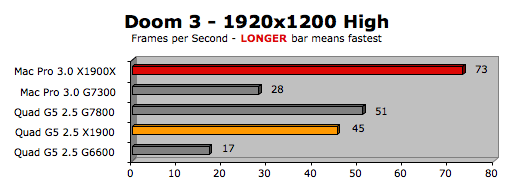
Doom 3 (1.3a) Settings: High Quality, No Vsync, No Anti-Aliasing, all other advanced settings enabled.
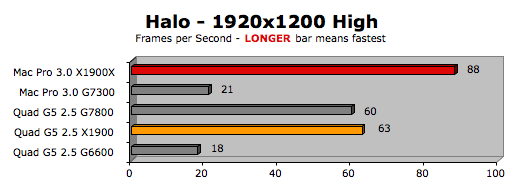
Halo (UB) Settings: All parameters enabled and at highest quality except Lens Flare which we had at a low setting. No FSAA. Sound disabled.
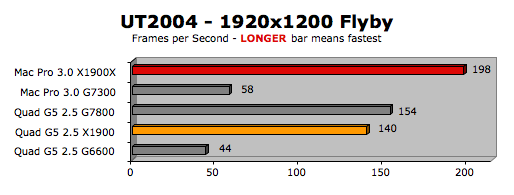
UT2004 (build 3369.2) Settings: Using SantaDuck Toolpak, we ran the Inferno Flyby and Botmatch with Graphics Enabled, Sound Disabled, and Maximum Quality Settings.
CONCLUSION
The Radeon X1900 GT for G5 provides welcome relief from the dearth of graphics card upgrades for the dual-core PCIe based G5 Power Macs. Its performance is roughly on par with the GeForce 7800 GT that Apple offered as a CTO option on the dual-core G5 (and that we wish they had offered as an aftermarket kit).

If you are one of many buyers who were stuck with the GeForce 6600, you will love this card. However, don't expect it to perform on the level with the Radeon X1900 XT offered with the Mac Pro.

WHAT ABOUT THE QUADRO?
We didn't include the $1650 Quadro FX 4500 which Apple is promoting for "high-end scientific visualization." It would be overkill for most applications including games. And if you look at the specs listed on the Mac Pro Graphics Page, the X1900 XT has better specs in two out of three categories.

WHERE TO BUY THE ATI RADEON X1900 GT FOR G5
You can order it direct from ATI/AMD's online store for $349. You can trade in your old graphics card for a $50. Click here to get the "trade up" form.


Other World Computing is selling it on their site. It's not on the SmallDog Electronics website yet, but I assume they will be selling it, too.

OTHER ARTICLES ON THE MAC PRO and Quad-Core G5 by BARE FEATS

Mac Pro 3D Game "Slug Fest" -- the Radeon X1900 vs GeForce 7300 vs two G5 Power Macs with high-end graphics cards

Special Report on the Radeon X1900 XT running in x4, x8, and x16 PCIe slots of a Mac Pro

Mac Pro with X1900 XT running Motion 2 and iMaginator

Mac Pro versus Quad-Core G5 -- Updated Photoshop CS2 results under 10.4.8

Original Test Results on Mac Pro for Photoshop CS2, After Effects 7, iMovie HD, Final Cut Pro, FileMaker 8.5, and Cinebench 9.5

Fastest Boot Drive for the Mac Pro

What You Should Know About Mac Pro Memory

WHERE TO BUY MAC PRO GRAPHICS CARDS
The GeForce 7300 GT (16X, 256MB, dual-link DVI + single-link DVI port) is standard. However, we recommend the Radeon X1900 XT (16X, 512MB, two dual-link DVI ports) as a CTO option. It's much faster than the GeForce 7300 GT and just a hair slower than the outrageously expensive Quadro FX 4500. To custom order your Mac Pro with the Radeon X1900 XT, go to the Apple Store and click on the Mac Pro graphic.

Fortunately, you can order the Radeon X1900 XT as an aftermarket kit. We ordered our Mac Pro with the standard GeForce 7300 GT so we could get it within a few days. The X1900 XT we ordered separately was back ordered for 5 weeks. Click THIS link (or any Apple link on this page) to order your X1900 XT kit so we get credit for the sale.

WHERE TO ORDER YOUR MAC PRO (or Quad-Core G5)

If you live in the USA and plan to purchase an APPLE product, please CLICK THIS LINK or any APPLE DISPLAY AD to help us earn our affiliate commission.

DON'T LIVE in USA?
Readers in Canada should visit Apple Store, Canada.
Readers in France should visit Apple Store - France.
Readers in Germany should visit Apple Store - Germany.
Readers in Italy should visit Apple Store -Italy.
Readers in the United Kingdom should visit Apple Store - UK.

WHERE TO ORDER YOUR MAC PRO MEMORY
You can order extra Mac Pro memory from
Apple USA when you custom order your Mac Pro, though it might delay delivery. Plus, we think Apple charges too much for their memory upgrades.

We recommend getting your memory upgrades from third party vendors. In our initial Mac Pro testing, we used kits provided by Other World Computing. They are a good source for quality memory at a reasonable price. Plus OWC has a "Trade In Your Factory Memory" REBATE program.

TransIntl.com is shipping Mac Pro memory with Apple suggested heat sink specs. They took great care to engineer their heat sinks for maximum thermal efficiency using 6 fins on each side (versus 4 on the Apple factory modules) and special aluminum alloy. We tested these and can vouch that their heat sinks are truly efficient in absorbing and dissipating heat.

MaxUpgrades offers their unique "MacSink" design for a heat sink (using 2 clips instead of 4) which results in more fin area exposed to the airflow. We've tested them and they are very effective. MaxUpgrades will sell you the memory with the heat sink or just the heat sink. Their prices are very competitive, too.

We also tested the Data Memory Systems Mac Pro memory with conventional heat spreaders. It ran an average of 10 deg F warmer than the memory with "fat finned" heat sinks. DMS is also offering memory with Apple approved" heat sinks as an option.

MAC DISPLAYS
We just bought the newest, lower priced ($999) 23" Cinema display with the improved brightness and contrast. We love it. And the pink hue on gray screens is gone. The 20" model is down to $699.

We know we've sung the praises of the Dell 24" Ultrasharp in the past but we are partial to the sleek looking aluminum Cinemas -- especially with the latest improvements. But if you still want to go for the Dark Side -- I mean -- Dell, it's on sale for $703 right now. For more details on it, read our updated review of the latest model.

Has Bare Feats helped you? How about helping Bare Feats?

© 2005-2006 Rob Art Morgan
"BARE facts on Macintosh speed FEATS"
Email , the webmaster and mad scientist