Back in June of 2008, the Western Digital Velociraptor 10K 3Gb/s 300GB SATA drive became the new "darling" of the fast boot volume enthusiasts. We continue to enjoy our pair but there's a "new sheriff in town": A striped pair of Intel X25-M Solid State SATA Drives.
I say "a striped pair" because at 80GB, you'll need at least two of them to have a decent amount of storage space (160GB) for OS X, your apps, and some of your data. And as a striped pair, they go like "stink."
Mounting in a Mac Pro? We used the MaxConnect Heatsink/Sleds from MaxUpgrades that were designed for the "bare" Velociraptor. They are perfect for mounting the dual X25s (or any other 2.5" drive) in the Mac Pro factory bays.
THE COMPETITORS
We gathered the fastest 7K SATA drives for comparison with the Intel X25-M and the 10K Velociraptor. We included the Samsung Spinpoint F1, the WD Caviar Blue (640GB -- more capacity that two Velociraptors), and the WD 10K SATA drive that preceded the Velociraptor, the Raptor 10K 150GB. And since we striped the X25-Ms, we included results for "striped" dual drive sets of the other drives.
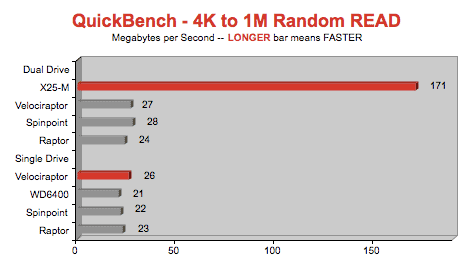
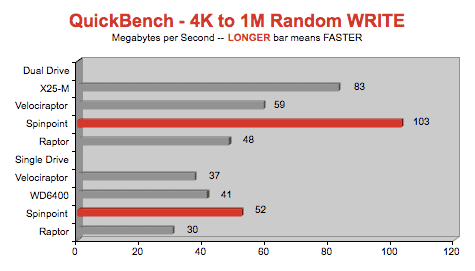
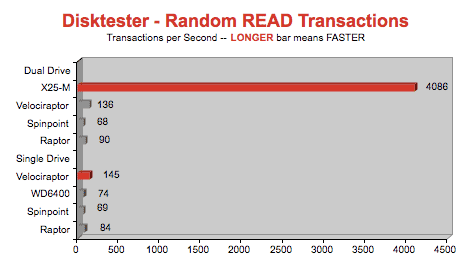
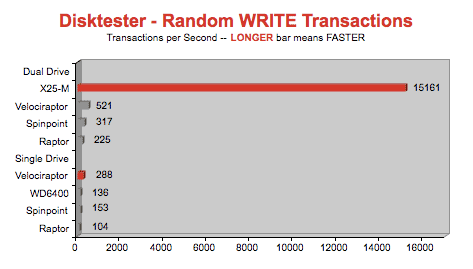
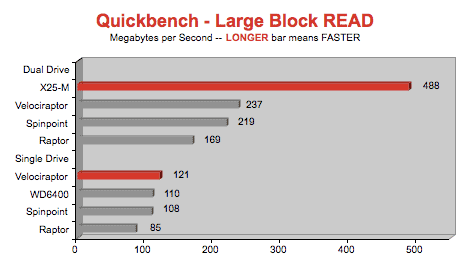
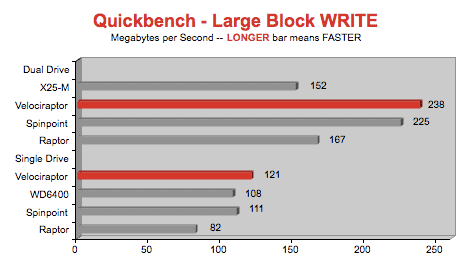
GRAPH LEGEND
Dual Drive = Striped (RAID 0) Set
X25-M = Intel X25-M Solid State SATA 80GB Drive (we tested a striped pair only)
Velociraptor = WD Velociraptor SATA drive (10K RPM, 300GB, 16MB cache, 3Gb/s, model WD3000BLFS "bare")
Spinpoint = Samsung Spinpoint F1 SATA drive (7K RPM, 1000GB, 32MB cache, 3Gb/s, model HD103UJ)
Raptor = WD Raptor SATA drive (10K RPM, 150GB, 16MB cache, 1.5Gb/s, model WD1500ADFD)
WD6400 = WD Caviar Blue (7K RPM, 640GB, 16MB cache, 3Gb/s, model WD6400AAKS)
BLUE RIBBON GOES TO...
...the dual Intel X25-M SATA Solid-State Drives with their staggering random read performance which makes them a compelling choice for a boot volume. Equally staggering is the price (about $1400 for two.) So this option requires a serious commitment to speed. It also requires the MaxConnect WD Velociraptor Heatsink/Sled from MaxUpgrades to mount them in the Mac Pro. Or you can use the Pro Drive RAID sled from Trans International if you only want to occupy one sled slot -- but you lose some of the large sustained speed since it's a port multiplier.
SECOND PLACE RIBBON GOES TO...
...a pair of WD 10K 300GB Velociraptor 3Gb/s SATA drives. Though we mounted our "bare" 2.5" Velociraptors (model WD3000BLFS) on the same MaxConnect WD Velociraptor Heatsink/Sled from MaxUpgrades, you can buy them in "backplane ready" form (model WD3000HLFS) with an "ice pak" gives them a 3.5" form factor, attaches to the factory Mac Pro sleds, and with the ports lining up correctly with motherboard.
DREAM DRIVE CONFIGS
You could argue that the perfect setup for a power user with a Mac Pro is to have dual X25-Ms for boot volume and dual Velociraptors (with their superior sustained write speed) for data capture and default document storage.
For professional photographers who edit very large files with lots of layers, I would reverse the dream setup. I would boot from a single or dual Velociraptor and use a dedicated pair of Intel X25-Ms as a dedicated scratch volume.
Silverado Systems is offering a custom built "Monster Mac Pro" that comes with exactly that drive configuration. Ask about the special discount coupon (SSD_01_DISC).